Ctrl+Alt+Delete on Mac: What to Press Instead
Ctrl+Alt+Delete does nothing on a Mac. The Mac version is Command + Option + Esc, which opens Force Quit Applications in one step. This guide maps every item on the Windows Ctrl+Alt+Delete screen to its Mac shortcut, and shows how to send Ctrl+Alt+Delete to a Windows PC or virtual machine from a Mac.

Ctrl+Alt+Delete on a Mac is ⌘ Command + ⌥ Option + Esc. It opens the Force Quit Applications window, where you pick a frozen app and click Force Quit. For the full Windows Task Manager view of every process, CPU and memory, open Activity Monitor with ⌘ Command + Space. In a Windows remote desktop or virtual machine, use Fn + ⌃ Control + ⌥ Option + Delete or the app’s Send Ctrl+Alt+Del menu.
What does Ctrl+Alt+Delete do, and what is the Mac version?
On Windows, Ctrl+Alt+Delete opens a security screen with Lock, Switch user, Sign out, Change a password and Task Manager. On a Mac, those jobs are spread across separate shortcuts, which is why pressing the Windows keys on a Mac keyboard (Control + Option + Delete) does nothing useful. The table maps every item on that Windows screen to its Mac equivalent:
| Windows Ctrl+Alt+Delete screen | Mac equivalent | Mac shortcut |
|---|---|---|
| Task Manager: end a frozen app | Force Quit Applications | ⌘ Command + ⌥ Option + Esc |
| Task Manager: processes, CPU, memory | Activity Monitor | ⌘ Command + Space, “Activity” |
| Lock | Lock Screen | ⌃ Control + ⌘ Command + Q |
| Sign out | Log Out | ⇧ Shift + ⌘ Command + Q |
| Switch user | Fast User Switching menu | Control Center, or the user name in the menu bar |
| Change a password | System Settings > Users & Groups | Apple menu > System Settings |
| Power: restart | Restart without saving | ⌃ Control + ⌘ Command + Power (no Touch ID) |
| Ctrl+Shift+Esc: Task Manager directly | Activity Monitor | Spotlight, or keep it in the Dock |
Every Mac shortcut above is listed on Apple’s Mac keyboard shortcuts page, and the Windows side comes from Microsoft’s Windows shortcuts reference. We checked each Mac shortcut on macOS 27.
How to Ctrl+Alt+Delete on a Mac, step by step
- Press Command + Option + Esc. Command (⌘) sits either side of the space bar; Option (⌥) is next to it; Esc is top left. On a Windows keyboard connected to a Mac, that is Windows + Alt + Esc.
- Pick the app that is stuck. Frozen apps are marked (Not Responding).
- Click Force Quit. The app closes. Unsaved changes in that app are lost; other apps keep running.
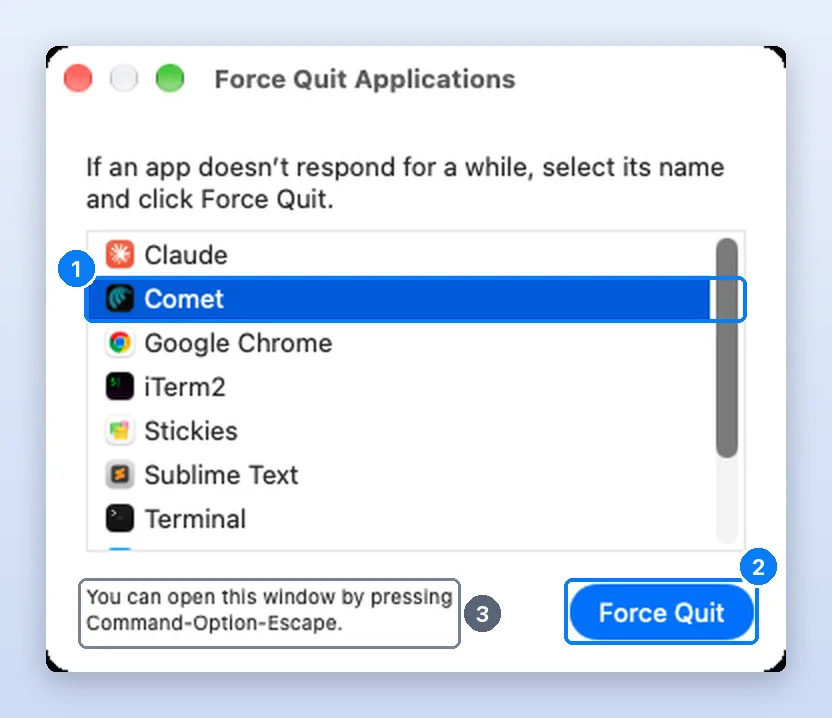
Press these three keys together: Option (or Alt), Command, and Esc. (If your Mac has a Touch Bar, Esc is on the left side of the Touch Bar).
Where is the Task Manager part?
If you pressed Ctrl+Alt+Delete on Windows to reach Task Manager, the Mac tool you want is Activity Monitor. It lists every running process, sorts by CPU or memory, and shows the same kind of live graphs as the Performance tab.
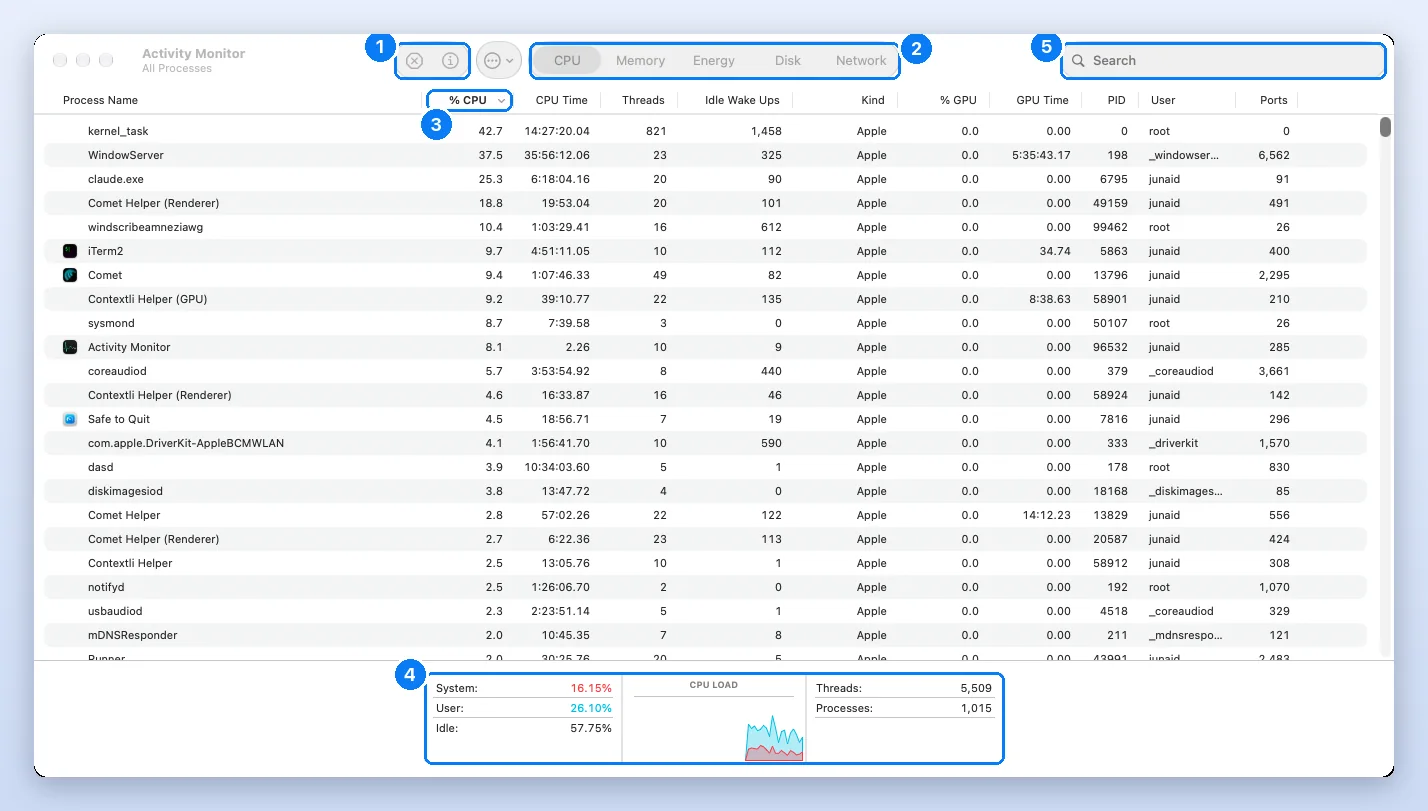
Our Activity Monitor guide explains every tab, and the Task Manager on Mac overview has the full shortcut table.
How do I send Ctrl+Alt+Delete from a Mac to Windows (Remote Desktop)?
To send Ctrl+Alt+Delete from a Mac to a Windows PC, press Fn + ⌃ Control + ⌥ Option + Delete, or choose Send Ctrl+Alt+Del from the remote app’s menu. This is the case most guides skip. When you are connected to a Windows PC from a Mac, macOS grabs Command + Option + Esc for itself, and a Mac keyboard has no key labelled Alt or a forward Delete. Use one of these, depending on the app:
| You are using | Send Ctrl+Alt+Delete with |
|---|---|
| Windows App (formerly Microsoft Remote Desktop) | Fn + ⌃ Control + ⌥ Option + Delete (forward delete), or Ctrl + Alt + End inside the session |
| Parallels Desktop (Windows VM) | Devices menu > Keyboard > Ctrl + Alt + Del, or Fn + ⌃ Control + ⌥ Option + Delete |
| VMware Fusion | Virtual Machine menu > Send Key > Ctrl-Alt-Del, or Fn + ⌃ Control + ⌥ Option + Delete |
| Windows on an Intel Mac via Boot Camp | ⌃ Control + ⌥ Option + Delete (Option acts as Alt; add Fn if Windows expects forward delete) |
| AnyDesk, TeamViewer, Chrome Remote Desktop | The Ctrl+Alt+Del button or Actions menu in the session toolbar |
| Apple Screen Sharing to a Mac | Not needed: use ⌘ Command + ⌥ Option + Esc on the remote Mac |
If you are using Remote Desktop on a Mac to access a Windows computer, you cannot press Ctrl + Alt + Del directly because macOS captures those keys.
On a MacBook, Fn + Delete produces a forward delete, which is why the Fn key appears in these combinations. On a full-size Mac keyboard with a separate ⌦ key, you can press that instead of Fn + Delete.
Why doesn’t Mac just use Ctrl+Alt+Delete?
Ctrl+Alt+Delete started as a reboot shortcut on the IBM PC in 1981, designed to be hard to press by accident, and Windows NT later turned it into the secure attention sequence that only the operating system can intercept (see Wikipedia’s history of Control-Alt-Delete). The Mac never had that PC heritage. Its modifier keys are laid out differently too: Command does most of what Ctrl does on Windows, and Option does what Alt does. So Apple kept a three-key force quit, just on Command + Option + Esc.
The practical difference: on Windows the shortcut opens a menu first; on a Mac it goes straight to the list of apps, which is one click faster.
What if Command + Option + Esc does nothing?
- Use the Apple menu: Apple menu > Force Quit… opens the same window without the keyboard.
- Try the Dock: hold Option, right-click the app icon, choose Force Quit.
- Check the keyboard: a Bluetooth keyboard with a flat battery or a stuck modifier key is a common culprit. Try the built-in keyboard.
- Restart: Apple menu > Restart, or on keyboards without Touch ID, ⌃ Control + ⌘ Command + Power.
- Force shut down: hold the power button or Touch ID for up to 10 seconds. See MacBook frozen for the full sequence.
Windows habits that trip people up on a Mac
- Closing the window does not quit the app. The red button closes the window; the app keeps running. Use ⌘ Command + Q.
- Alt+F4 is ⌘ Command + Q for the app, or ⌘ Command + W for one window.
- Alt+Tab is ⌘ Command + Tab. Keep holding Command and press Q to quit the highlighted app from the switcher.
- Windows key + L is ⌃ Control + ⌘ Command + Q to lock the screen.
Watch it done
Frequently asked questions
Is there a Ctrl+Alt+Delete on Mac?
Yes, it is Command + Option + Esc. It opens Force Quit Applications, where you select a frozen app and click Force Quit.
How do I Ctrl+Alt+Delete on a MacBook?
Press Command + Option + Esc on the MacBook keyboard. On MacBook Pro models with a Touch Bar, Esc is at the left end of the Touch Bar.
What is the Mac version of Task Manager?
Activity Monitor. Open it with Command + Space, type Activity Monitor and press Return. It shows every process with its CPU, memory, energy, disk and network use.
How do I Ctrl+Alt+Delete on a Mac keyboard in Windows Remote Desktop?
Press Fn + Control + Option + Delete, or use Ctrl + Alt + End inside the session. Most remote desktop and virtual machine apps also have a Send Ctrl+Alt+Del menu item.
How do I close the Force Quit window on Mac?
Press Esc, or click the red close button in its top-left corner. Closing it does not quit any app.
How do I restart a frozen Mac?
Choose Apple menu, Restart. If the Mac does not respond, hold the power button or Touch ID for up to 10 seconds until it turns off, then press it again to start up.
Why use the Mac's Force Quit instead of Activity Monitor?
Force Quit is faster for one frozen app and only lists apps, so you cannot end a system process by mistake. Activity Monitor is for hidden processes and for seeing CPU and memory use.
Junaid is a software engineer who builds native macOS apps, which means he spends his days inside Activity Monitor, Instruments and the Terminal watching how Mac apps use CPU and memory. Before that he worked as an L2 technical support consultant, resolving around 500 escalated customer tickets with a satisfaction score above 95%. He holds a BSc in Software Engineering from NUST. Every step on this site is re-run on a real Mac before it is published.